Sell to consumers in the EU? Then there’s something new on your to-do list. Since 27 September 2026, every online shop must show a standard notice about the legal guarantee (the EU guarantee notice), and products whose producer guarantees them for more than two years must also display a new label: the EU GARAN label. (For the curious, both come from Directive (EU) 2024/825, and Implementing Regulation (EU) 2025/1960 sets how they look.)
Don’t worry, it’s less scary than it sounds. This guide walks you through what each one is, which products need which, where to show them, and the little mistakes that trip up stores even when both are on the page. At the end, we’ll show you how to do it all in WordPress and WooCommerce.
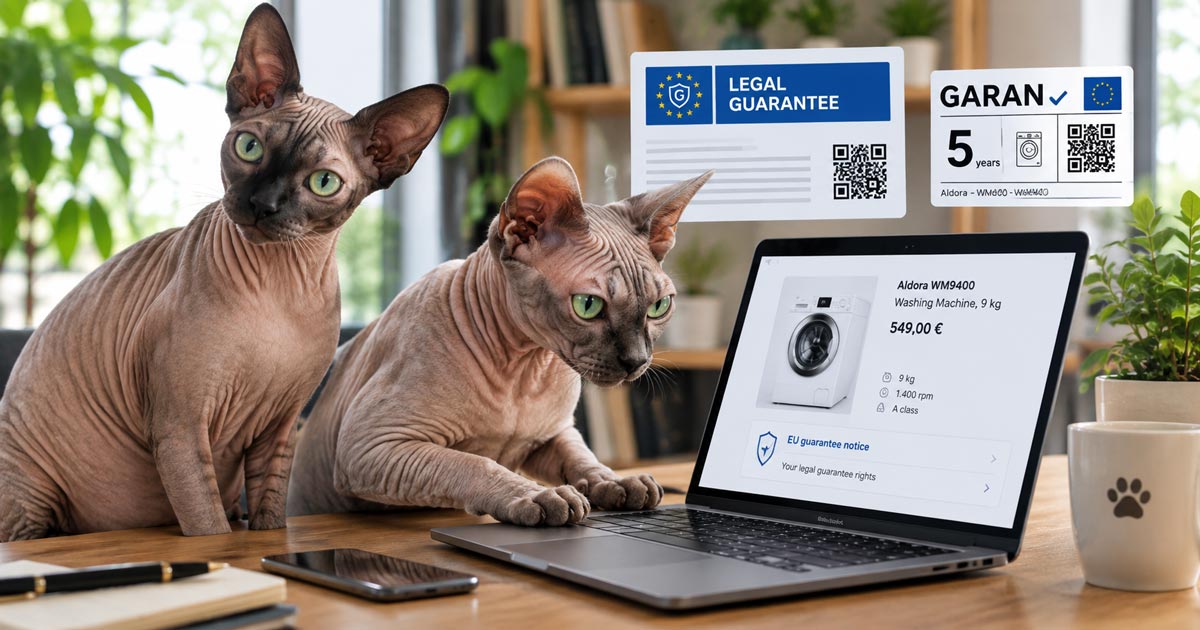
Quica, our in-house Sphynx compliance officer, read the whole regulation. Well, she slept on it, which in her professional opinion counts as a thorough review. Maria read the annexes, mostly by sitting on them.
The notice and the label, in one minute
| EU guarantee notice | EU GARAN label | |
|---|---|---|
| Official name | Harmonised notice on the legal guarantee of conformity | Harmonised label for the commercial guarantee of durability |
| Who shows it | Every shop selling goods to consumers in the EU | Shops selling a product whose producer offers a qualifying guarantee |
| What it tells the customer | They have a legal guarantee of at least two years | The producer guarantees this product for more than two years |
| Where | Shop-wide, in a prominent place, before the order is placed | Next to the product, and again before the order is placed |
| Can you change it? | No: official artwork, in the customer’s language | Only three fields: the years, the Brand/Trademark, and the Model identifier |
The official European Commission summary for businesses is on Your Europe.
Short version: we built a plugin that does all of this for you, and checks every day that the notice is still there. See how it covers each step.
Step 1: Show the EU guarantee notice
This one is for everyone. If you sell goods to consumers in the EU, you need it, even if none of your products have a producer guarantee.
- Use the official artwork. The Commission publishes it in all 24 EU languages. You cannot redraw, recolor, or edit it, and online it must be in color.
- Show it in the customer’s language, or at least in the language of the page they are reading.
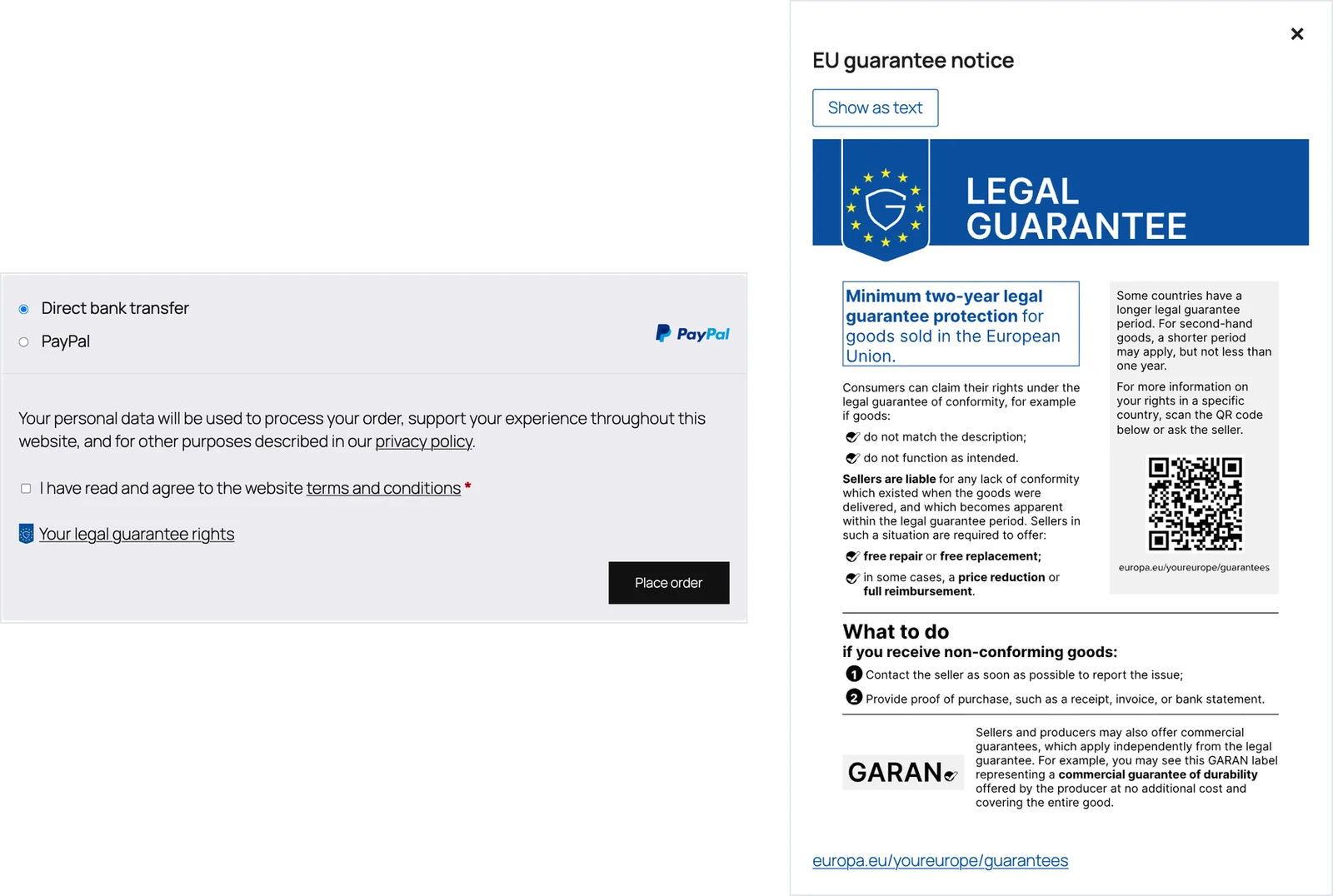
- Make it prominent, and available before the customer orders. The Commission’s guidelines show it at the checkout, before the order is placed. A link that opens the full notice works well: right before the order button, and in the footer of every page.
- Make it accessible. The notice is an image with no readable text. Since 28 June 2025, the European Accessibility Act requires online shops to offer a text alternative, so include the notice’s official text as well.
The legal guarantee lasts at least two years across the EU, and longer in some countries: three years in Portugal, Spain, and Sweden, for example. The notice says only “at least two years”, since it is the same across the EU.
Step 2: Find out which products qualify for the GARAN label
Here’s the part that catches people out: the label is not about your shop’s guarantee or warranty. A product only gets it when all four of these are true:
- the guarantee is offered by the producer;
- at no extra cost to the customer;
- it covers the whole product, not one part of it;
- it lasts more than two years.
A guarantee from your shop, a paid extended warranty, or a 10-year motor warranty alone do not qualify. Putting the label on those products can mislead customers, and that’s a consumer law problem of its own.
Reselling other brands? The producer decides whether to offer the guarantee. If they do, and they tell you, the label is yours to show. Making your own products? Then you’re both the producer and the seller, so it’s all on you.
Maria’s take on the “whole product” rule: ten years on the motor alone is like a ten-year guarantee on one whisker. Not a GARAN label.
Step 3: Show the label correctly
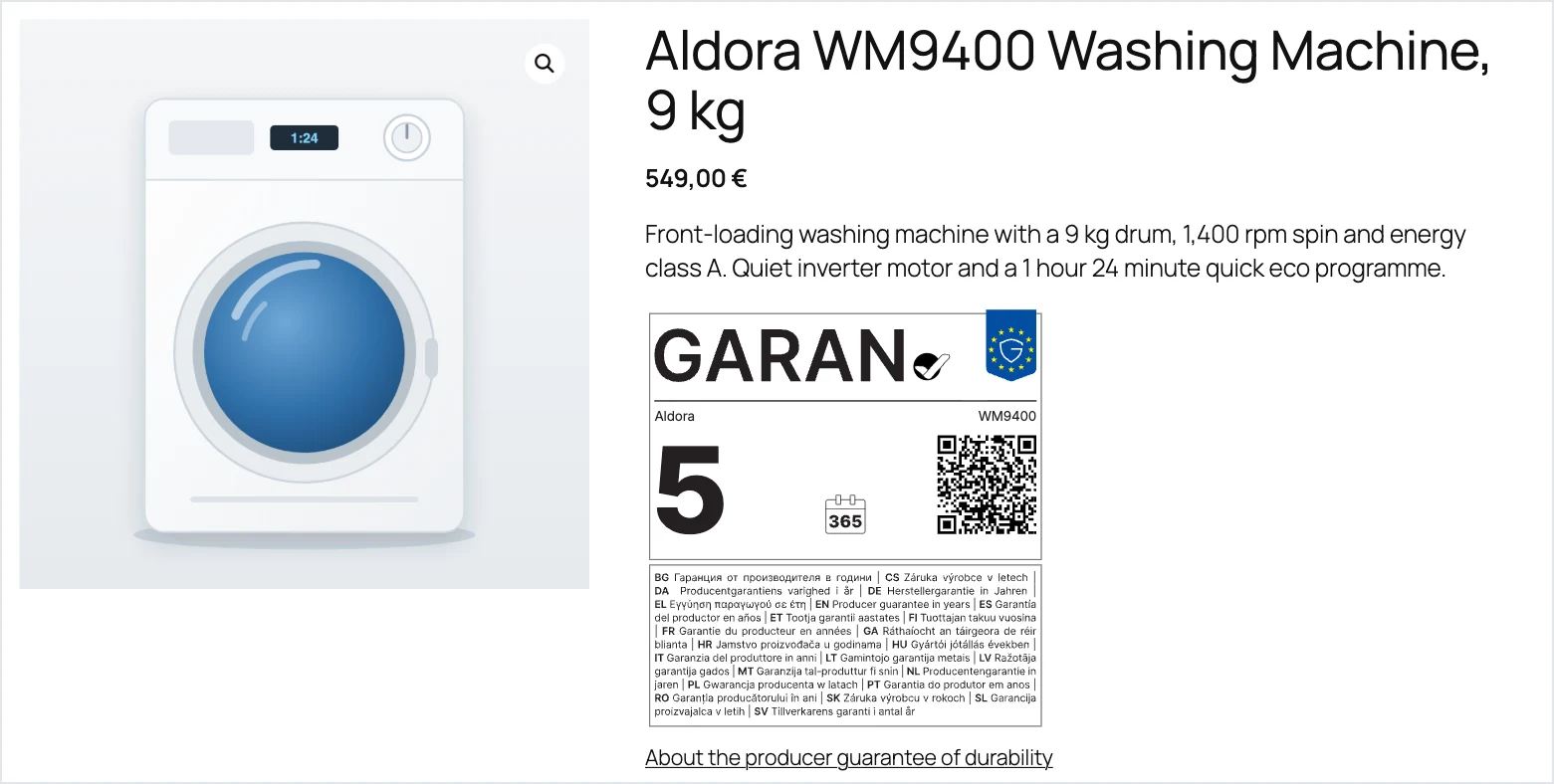
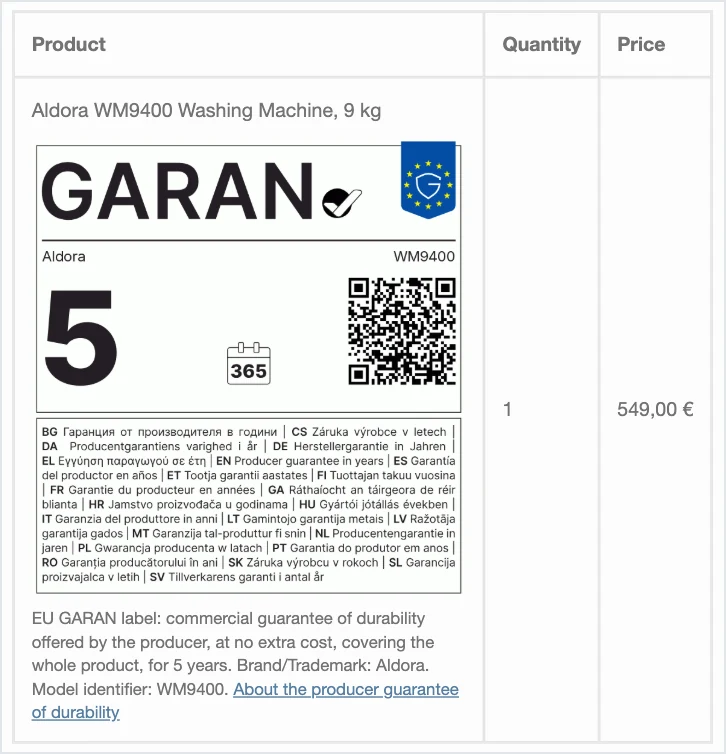
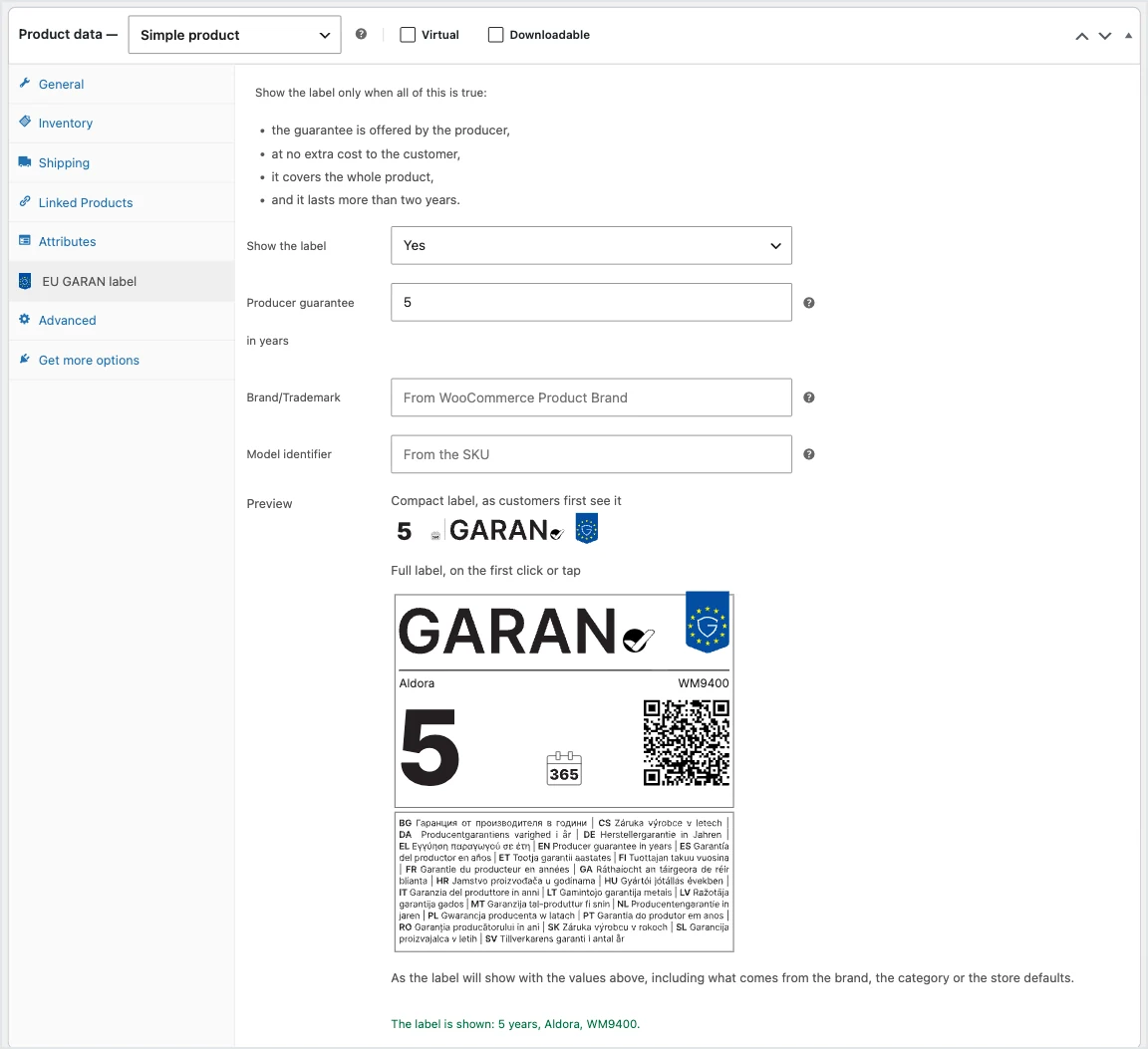
- Fill in the three editable fields: the guarantee in years, the Brand/Trademark of the producer offering it, and the Model identifier. Nothing else on the label can change.
- Write the years as whole or half years, with a comma: 5, or 4,5. Never 4.5, and never 2,2 from a months conversion.
- Keep the official typeface, Inter, and the official colors. No black and white online, no squeezed or shortened text.
- Place it next to the product, on the product page, where the customer sees the price.
- A compact version is allowed online. The regulation calls it the nested display: a small label that opens the full one on the first click or tap. One click, not a page away.
- Show it again before the order is placed, in the cart or checkout, for each product that has it.
Step 4: Repeat both in the order confirmation
The order confirmation must repeat the information the customer received before buying, and the Commission’s guidelines ask for the notice and the label in it. Add the notice to your order emails, and the label under each item that has one.
One easy-to-miss detail: keep the label as it was when the customer ordered. If the producer changes the guarantee next year, an old order should still show what that customer actually bought.
Step 5: Check that the notice stays there
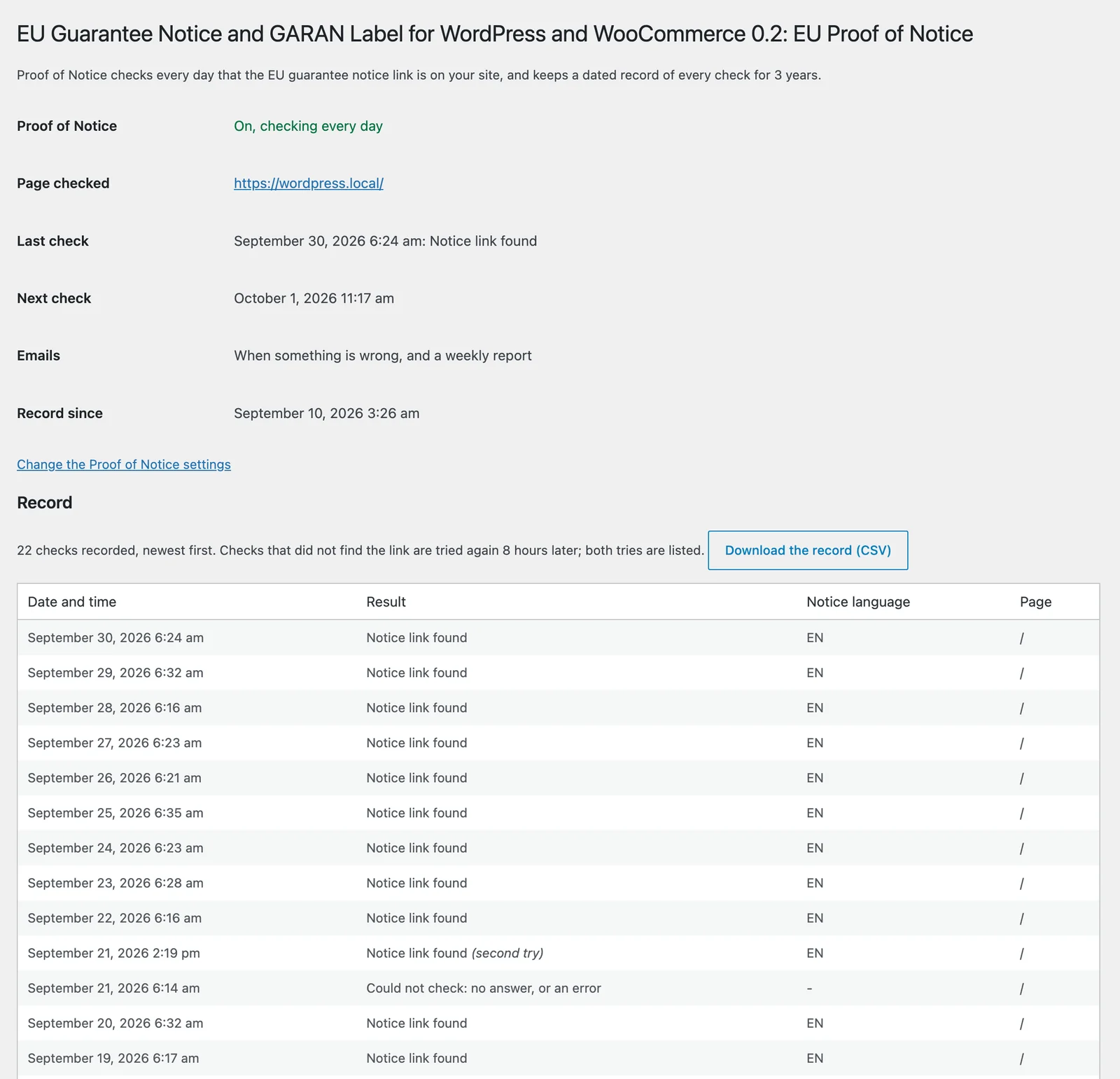
Getting it right on day one is great. Keeping it right is the tricky bit. A theme update, a new footer, a page builder, or a caching plugin can quietly remove the notice, and usually the first to notice is a customer, or worse, an authority.
So check your checkout and footer after every change to your site, and keep a dated record of when the notice was there. If anyone ever asks, a record, check by check, beats “I’m pretty sure it was always there”.
Ask Maria how easily a footer disappears. She once removed one from a staging site by walking across the keyboard, and nobody noticed for a week.
Common mistakes
- Redrawing the notice or the label in HTML and CSS instead of using the official artwork.
- Loading the label without the Inter typeface, so it shows in whatever font the visitor has.
- Showing the notice only at the top of the checkout page, or only on a separate page nobody opens.
- Turning the label on for every product, including those with no qualifying producer guarantee.
- Writing half years with a point, or rounding months into odd figures.
- A compact label that needs more than one click to show the full one.
- Forgetting order emails, or showing the product’s current label instead of the one at the time of the order.
Doing it in WordPress and WooCommerce
Sounds like a lot? That’s exactly why we built EU Guarantee Notice and GARAN Label for WordPress and WooCommerce. It takes care of every step above:
- Step 1: the official notice in all 24 EU languages, following the page language, as a link right before the Place order button (classic and block checkout), in the footer, or anywhere you add a link. Its official text is one click away, for accessibility.
- Step 2: the label stays off until you switch it on, so it never shows on products that do not qualify. Set it once for the store, a category, or a brand, and change it on any product or variation.
- Step 3: the official artwork and Inter, the years always written the EU way, the nested display opening the full label on the first click, on the product page and again at checkout.
- Step 4: the notice and the label in the customer’s order emails, with the label saved on each order as the customer saw it.
- Step 5: Proof of Notice checks every day that the notice is still on your site, emails you if it goes missing, and keeps a dated record of every check for three years, with a weekly report and a spreadsheet download.
Accessible, not just present. The official notice and label are images: a screen reader gets nothing from them, and a customer who zooms in or translates the page gets nothing either. This is where many of the available WordPress and WooCommerce implementations fall short of the European Accessibility Act while looking perfectly compliant. The plugin keeps the official artwork and adds what the images lack: the notice’s official text in all 24 EU languages behind a “Show as text” button, a spoken description of every label with its years, Brand/Trademark and Model identifier, and a notice window that can be opened, read, and closed with the keyboard alone.
Not using WooCommerce? It works on any WordPress site too, with its blocks and shortcodes.
See the plugin and its launch pricing, or read the documentation.
Tested to purr-fection by Quica and Maria, who approved the notice, the label, and every daily check the way they approve everything: by falling asleep on the keyboard the moment we hit save.
Selling across the EU? The guarantee rules are not the only EU paperwork on your plate. Our VAT Number and EU VIES Validation for WooCommerce collects your business customers’ VAT numbers, checks them against VIES, and removes VAT on qualifying intra-EU B2B orders. Coming from another VAT plugin? Its Zero-Touch Migration reads the numbers your old plugin left behind, with nothing to export or import.
Frequently asked questions
Do I need the notice if none of my products have a producer guarantee?
Yes. The notice covers the legal guarantee every consumer has, so every shop selling goods to consumers in the EU must show it. The label depends on the product.
Does this apply to shops outside the EU?
It applies to shops selling goods to consumers in the EU. If you sell to EU consumers, check with a legal advisor how it applies to you.
Does it apply to services and digital content?
No. Both are about goods. Services and purely digital products have neither.
Is my own shop warranty a reason to show the GARAN label?
No. The label is only for a guarantee offered by the producer, at no extra cost, on the whole product, for more than two years.
Can I use my own design for the notice or the label?
No. Both use the official artwork. On the label, you only fill in the years, the Brand/Trademark, and the Model identifier.
The small print: this guide is general information, not legal advice. Each EU country applies these rules through its own national law, so if you’re unsure about your situation, have a quick word with a legal advisor in your country.
Quica and Maria say hi, and remind you that your notice is only as good as the last time someone checked it. No bugs, only purrs.