
WooCommerce stores often need more control over which shipping methods customers see at checkout.
You may want to:
- Hide paid shipping when Free shipping is available
- Offer a Flat rate only above a certain order amount
- Show special shipping options only to specific customers or user roles
- Avoid confusing customers with too many choices
Our free plugin Free shipping + Flat rate and hide other methods for WooCommerce helps you control shipping visibility directly inside WooCommerce, without custom code.
This guide explains how to use the newest features to create smarter shipping rules.
What the plugin does (quick recap)
By default, WooCommerce shows all available shipping methods that match a shipping zone.
Customers can easily end up seeing:
- Free shipping
- Flat rate
- Local pickup
- Multiple carrier methods
Even when Free shipping is available.
Too many options create friction and can slow down checkout decisions.
This plugin allows you to:
- Hide other methods when Free shipping exists
- Hide other methods when a Flat rate exists
- Keep checkout clean and predictable
If you are new to the plugin, you may want to read our original guide: Hide other WooCommerce shipping methods when Free shipping or Flat rate is available
The features below expand what you can do with that same logic.
Require a minimum order amount for Flat rate shipping
WooCommerce already allows Free shipping to require a minimum order amount.
Now you can apply the same idea to Flat rate (hide other methods).
Why this matters
Many stores need shipping logic, such as:
- Orders below 50 €: show standard shipping options
- Orders above 50 €: show only Flat rate
- Orders above 100 €: show Free shipping
Previously, this often required custom snippets or complicated setups. It is now available directly in the shipping method settings.
How to configure it
- Go to WooCommerce > Settings > Shipping
- Open your Shipping Zone
- Add or edit Flat rate (hide other methods)
- Locate the option: Flat rate requires…
- Select: A minimum order amount
- Enter the desired threshold
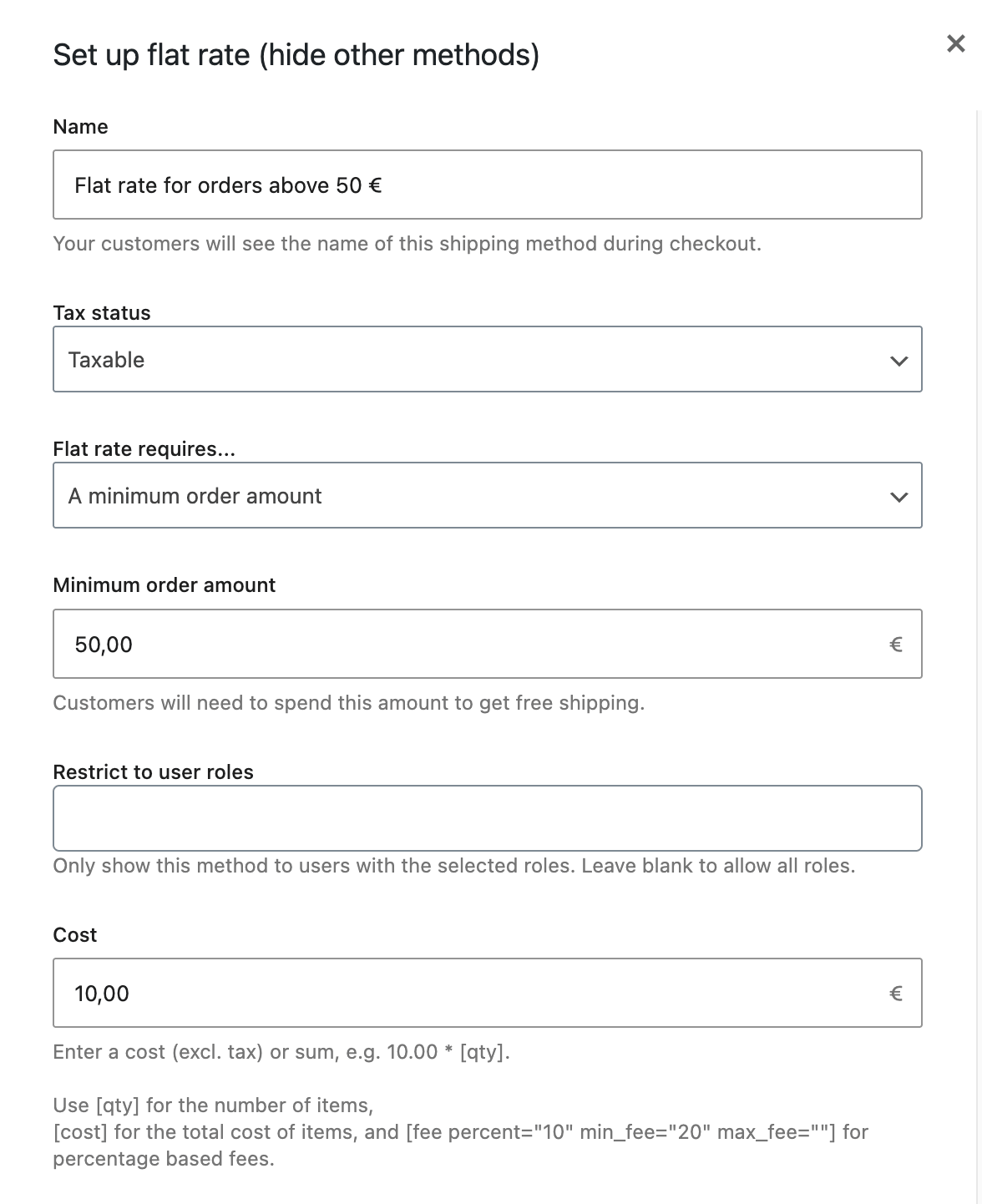
Once the condition is met, the Flat rate method becomes available, and other chosen shipping methods are automatically hidden.
Restrict shipping methods to specific user roles
You can now control who sees each shipping method. Each plugin shipping method includes a new option called: Restrict to user roles
This allows you to show or hide shipping methods based on the current customer. You can restrict shipping methods to:
- Any WordPress user role
- Custom roles created by membership or wholesale plugins
- Guest users (non-logged-in customers)
If the current user does not match the selected roles, the shipping method is hidden automatically.
Practical use cases
Wholesale vs retail shipping
- Wholesale customers see pallet or freight delivery
- Retail customers see standard shipping only
Local pickup only for staff or partners
Some stores use internal order creation workflows, for example, with Shop as Client for WooCommerce – Manual, Phone & Email Orders, where staff place orders on behalf of customers.
In this case, you can:
- Allow Local pickup only for Administrator or Shop Manager roles
- Prevent regular customers from selecting internal delivery options
Premium customer benefits
- VIP role gets Free shipping
- Guests and regular users do not
B2B stores
- Logged-in business customers see negotiated shipping methods
- Guests see only public delivery options
How to configure role restrictions
- Go to WooCommerce → Settings → Shipping
- Edit one of the plugin’s shipping methods
- Find the option: Restrict to user roles
- Select the allowed roles – You can include:
- Customers
- Subscribers
- Wholesale roles
- Custom roles
- Administrators and Shop managers
- Guest (non logged in users)
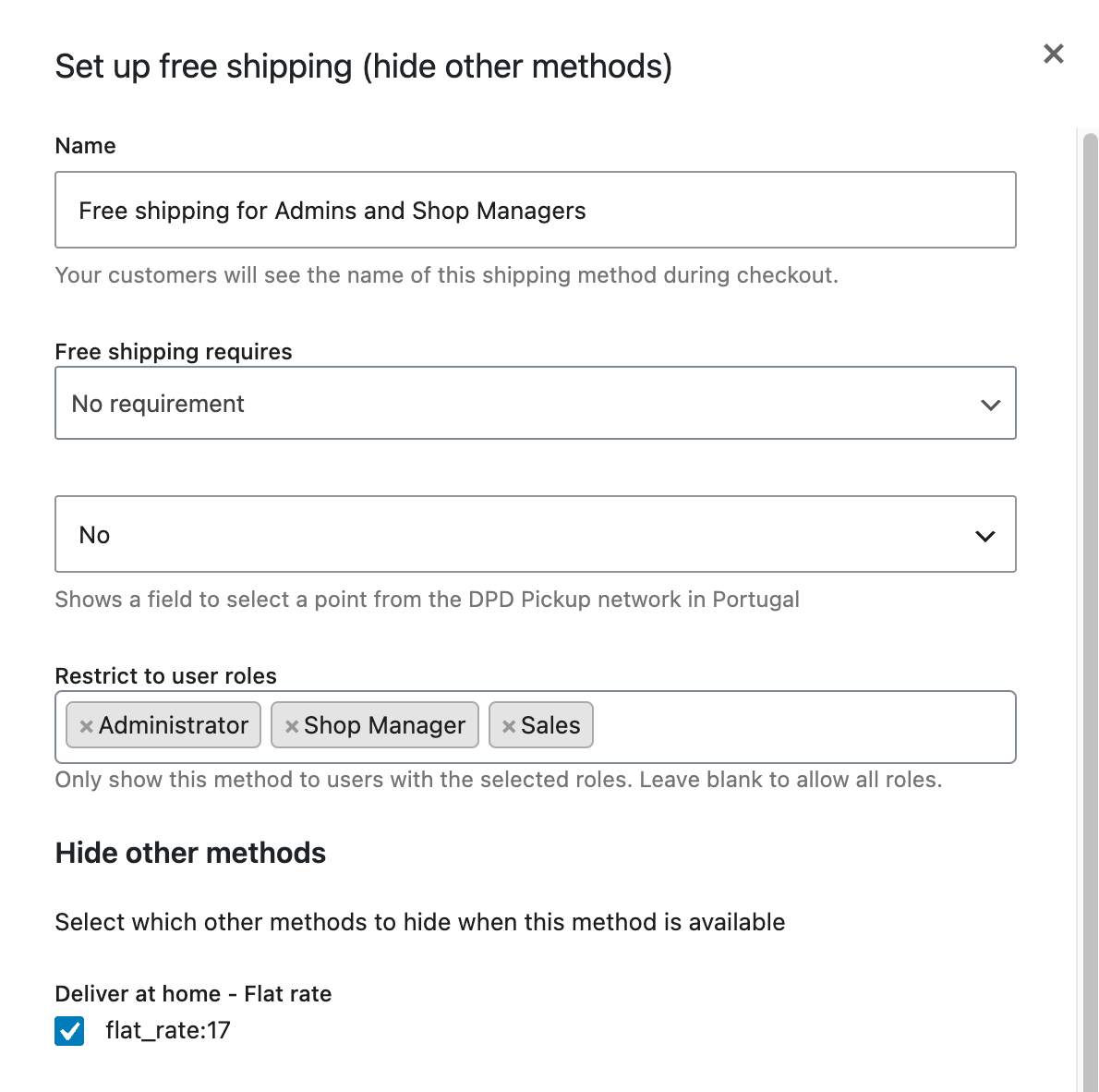
Only matching users will see that shipping method at checkout. No conditional plugins or code snippets required.
Combining minimum amounts and user roles
The real flexibility comes from combining conditions. Example configuration:
| Condition | Result |
|---|---|
| Guest user, order < 50 € | Standard shipping methods |
| Logged in customer, order ≥ 50 € | Flat rate only |
| VIP customer, order ≥ 100 € | Free shipping only |
All configured directly inside WooCommerce shipping settings. No PHP filters. No maintenance overhead.
Why hiding shipping methods improves checkout conversions
Too many shipping choices create decision friction. Reducing options helps customers:
- Decide faster
- Understand delivery costs immediately
- Complete checkout with confidence
Many WooCommerce stores implement a clear shipping hierarchy:
- Free shipping when available
- Otherwise Flat rate
- Otherwise fallback methods
These new options make it easier to implement that hierarchy.
Get the plugin
You can install the plugin for free from WordPress.org: Free shipping + Flat rate and hide other methods for WooCommerce
If you already use it, simply update from your WordPress dashboard to start using the new features.