
What if, instead of navigating the backoffice, you could simply ask your AI client to issue a label, request a collection, or generate the end-of-day report? Starting with version 15 of DPD Portugal for WooCommerce, it is now possible.
What can you do via AI?
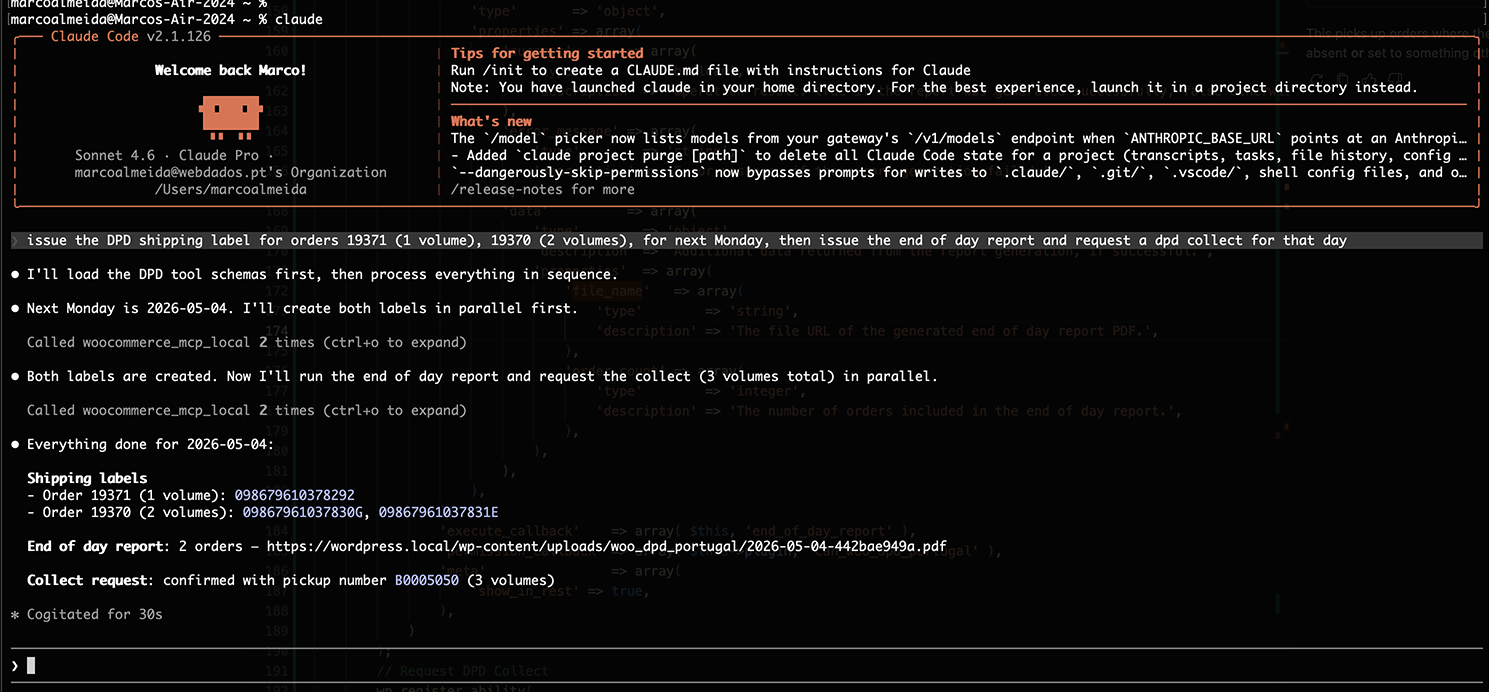
With this integration, you can perform the following operations directly from your favorite AI client, using plain language:
- Issue shipping labels (including the number of parcels and the shipping date)
- Request a DPD collection (including date, number of parcels, and notes)
- Generate the end-of-day report (including date selection)
Just describe what you need, and your AI client handles the rest.
How does it work?
The plugin exposes these three operations to WooCommerce MCP, WooCommerce’s native integration with the Model Context Protocol. This is an open standard that allows AI clients such as Claude, Cursor, and other MCP-compatible tools to connect directly to external tools and data, including your store.
To use this integration, you need to:
- Have WooCommerce MCP enabled under WooCommerce > Settings > Advanced > Features.
- Have your AI client connected to that MCP (how to set this up depends on the client you use and is outside the scope of our documentation and technical support, but the WooCommerce MCP documentation is a good starting point).
Once those two things are in place, the DPD Portugal for WooCommerce operations are automatically available in your AI client, with no additional plugin configuration required.
Available today
This feature is available in the current version of the plugin at no extra cost to all customers with an active license.
If you do not have the plugin yet, you can get it at nakedcatplugins.com.
Have questions or suggestions? Leave a comment or get in touch.