

WooCommerce works great for self-service checkout, but many stores still take orders by phone or email, especially when offering personalized prices or special deals.
In these scenarios, store teams need a way to apply negotiated prices quickly and accurately. By default, WooCommerce does not provide a straightforward way to do this without workarounds such as coupons or manual product edits.
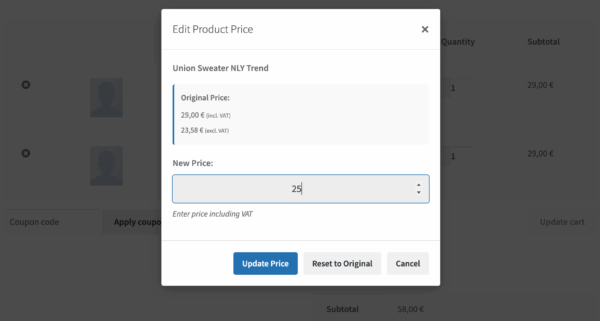
That is why the latest version of Shop as Client for WooCommerce PRO Add-on includes a new feature that allows administrators and shop managers to override product prices directly in the cart while preparing an order for the customer. This lets you offer special prices on the fly without touching product settings or coupons.
The challenge with phone and email orders
Imagine this situation:
- A customer calls asking for a discount on several products
- You agree on a special price over the phone
- Now you need to reflect that price in WooCommerce
Using coupons or editing product prices affects the wider store and risks misuse, and creating manual backend orders is slow and bypasses the normal frontend shopping experience.
What you really need is a way to build the order in the shop, just like a regular checkout, but with the flexibility to adjust prices for that specific order.
The solution: override product prices in the cart
With our Shop as Client for WooCommerce plugin, your store staff can:
- Add products to the cart as you normally would
- In the cart, enter the custom price for each item that needs adjustment
- Proceed to checkout and complete the order on behalf of the customer
This feature is ideal for phone and email orders, where pricing is agreed on a case-by-case basis. The override applies only to the current cart and order, leaving product prices unchanged for everyone else.
You can adjust prices for one or multiple products, depending on the agreement with the customer.
The overridden prices are used to calculate totals and taxes automatically, and the order is created as any other WooCommerce order.
This keeps everything consistent with your existing payment, tax, and shipping setup.
Why does this work better than coupons or manual orders
Overriding prices directly in the cart solves several common problems:
- No need to create or delete coupons
- No risk of discounts being reused later
- No need to change product prices globally
- No need to manually create orders in the admin
You stay within the standard WooCommerce checkout flow, reducing errors and saving time.
And if your shop accepts orders in multiple currencies, this is fully compatible with WooPayments’ multi-currency feature, which lets you override prices in the current cart currency and have them automatically converted when you change the currency.
Common use cases
This feature is handy for:
- Phone orders with negotiated prices
- Email quotes converted into completed orders
- One-off discounts for loyal customers
- Assisted checkout scenarios where prices need adjustment
If assisted sales are part of your daily workflow, price overrides quickly become essential.
Free plugin vs PRO add-on
The free Shop as Client for WooCommerce plugin allows administrators and shop managers to place orders on the frontend for registered customers or guests, using the standard WooCommerce checkout.
The PRO add-on builds on this foundation with advanced features designed for real-world assisted sales, including:
- Overriding product prices directly in the cart
- Searching for customers by email and previous orders
- Autocompleting customer details at checkout
- Using a “Request payment by email” gateway to send payment links
- Improving order handling and visibility in the admin
- Integrating with other plugins that add checkout and invoicing fields
Together, these features make it easier to handle phone and email orders accurately and efficiently.
In short
WooCommerce is excellent for self-service checkout, but real businesses often need more flexibility when dealing with customers directly.
Being able to override product prices in the cart while still using the standard frontend checkout removes friction for phone and email orders and helps prevent pricing errors.
If assisted sales are part of how your store operates, this feature in the Shop as Client for WooCommerce PRO add-on brings WooCommerce much closer to real-world selling.