

If your WordPress site runs WooCommerce, chances are that your wp_comments table is much larger than you think. What many store owners do not realize is that WooCommerce order notes are stored as comments (yes, even when HPOS is active). This means that order notes, blog comments, product reviews, and any other type of “comment” created by other plugins all live in the same database tables.
When those tables grow too large, even simple comment-related queries can become painfully slow. In this article, we will show a real-world performance problem we encountered, explain why it happens, and walk you through a practical way to fix it by archiving WooCommerce order notes.
A real performance problem from a customer website
We recently worked with a customer whose WooCommerce store was experiencing random slowdowns across the entire site. Frontend pages that displayed product reviews were slow. Blog posts with comments took longer than acceptable to load. Even the WordPress admin felt sluggish; you know that little red bubble on the sidebar? Yeah, that was slow to calculate.
After enabling query logging, one query immediately stood out. A comment-related query was taking more than 8 seconds to execute.
A closer look at the database revealed the real issue:
- The
wp_commentstable contained more than 1.4 million records - Over 1.38 million of those records were WooCommerce order notes
- The
wp_commentmetatable had more than 230 thousand rows
In other words, more than 98 percent of the comments in the database were order notes that were never meant to be displayed on the frontend.
Because WordPress uses the same tables for blog comments, product reviews, and order notes, every query that touches comments must handle an enormous dataset. This is why product review queries were extremely slow, even though the actual number of reviews was relatively small.
Why WooCommerce order notes hurt performance
WooCommerce stores order notes as comments with the comment_type set to order_note. From a data modeling perspective, this makes sense, but it has a significant side effect.
Most WordPress comment queries start by scanning the wp_comments table and then filtering by post ID, comment type, or status. When that table contains millions of rows, queries become slower, indexes become less effective, and MySQL has more work to do.
The problem becomes particularly serious when plugins run more complex queries that join the wp_commentmeta table, but do not properly filter by comment_type.
In the customer case that led to the development of this plugin, a product reviews-related feature was running comment queries that included comment meta, without restricting the query to product reviews. Because more than 1.38 million rows in the comments table were order notes, those queries had to scan an enormous amount of irrelevant data.
In theory, the solution would be to improve the plugin code. In practice, this is often difficult or unrealistic:
- Plugin authors may not prioritize performance edge cases
- Custom code may already depend on the existing plugin behavior
- Replacing a plugin can require rebuilding significant parts of the site
As a result, even well-built stores can end up with slow comment-related queries that are very hard to fix at the code level.
Yet those old order notes remain in the same tables WordPress uses for active content, such as blog comments and product reviews.
Why deleting order notes is not ideal
One possible solution is to delete old order notes. However, this is often not acceptable as they may be required for:
- Accounting and auditing
- Customer support history
- Legal or compliance reasons
For many store owners, deleting historical data is simply not an option.
What we really want is a way to remove order notes from active queries without losing the data.
Archiving order notes instead of deleting them
This exact problem led us to build a small, focused solution: Archive Order Notes for WooCommerce.
The idea is simple. Instead of deleting order notes, the plugin archives them into separate database tables. Once archived, those order notes are no longer part of WordPress core comment queries, and as a result:
- The
wp_commentstable becomes dramatically smaller - Comment-related queries become much faster
- Order notes no longer slow down blog comments, product reviews, or any other comment type
In the customer case mentioned above, archiving the order notes reduced the active comments table from more than 1.4 million rows to just a fraction of that size.
How the plugin works
Archive Order Notes for WooCommerce is intentionally designed as a micro plugin. It does one thing, and it does it well. Here is how it works at a high level:
- The plugin creates dedicated archive tables for order notes and order note meta
- You choose the age of the order notes to be archived, from 3 months up to 5 years
- Selected order notes are moved from the core WordPress tables to the archive tables
- Archived order notes are excluded from regular WordPress comment queries
The data is not lost. It is simply stored where it no longer impacts site performance.
What changes for the shop owner
From a shop owner’s perspective, nothing changes in day-to-day operations.
Archived order notes are still visible on the WooCommerce order edit screen. This means that support teams, store managers, and administrators can see the full order history exactly as before, without having to switch screens or learn a new workflow.
The difference is purely technical. Order notes are no longer part of WordPress core comment queries, but they remain accessible where they matter.
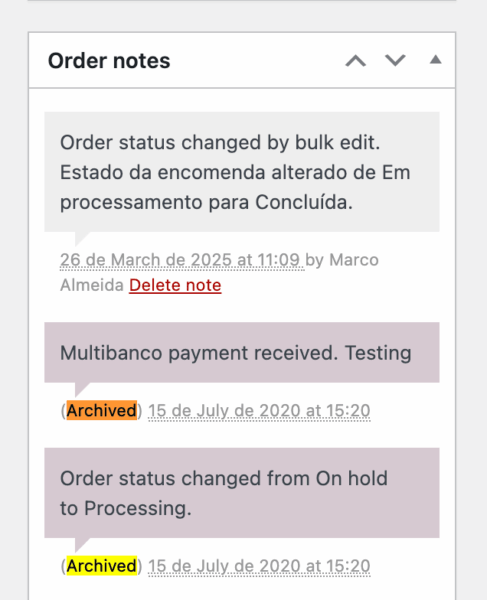
Archiving vs deleting order notes
The plugin also allows you to permanently delete old order notes instead of archiving them.
Deleting order notes can further reduce database size, but it comes with important downsides:
- Deleted data cannot be recovered
- You lose historical context for customer support and audits
- Deleting data may not be acceptable for legal or compliance reasons
For most stores, archiving is the safer option. It delivers the performance benefits without sacrificing historical data.
WP-CLI support for large stores
Archive Order Notes for WooCommerce relies on WooCommerce itself to handle background processing. WooCommerce includes Action Scheduler, which is a highly efficient and battle-tested system for running scheduled tasks.
By default, the plugin archives order notes gradually via scheduled hourly tasks. This makes day-to-day maintenance safe and reliable, even in busy stores.
However, in some situations, as the customer case described earlier, an initial cleanup is required to reduce the size of the comments tables as quickly as possible.
For these scenarios, Archive Order Notes for WooCommerce includes WP-CLI commands that let you archive or delete large volumes of order notes directly from the command line. This makes it possible to:
- Perform an initial bulk cleanup without waiting for scheduled tasks
- Avoid timeouts and memory limits
- Prepare the database so that the scheduled process can handle ongoing maintenance
This approach combines the safety of scheduled background processing with the flexibility needed for large, long-running stores.
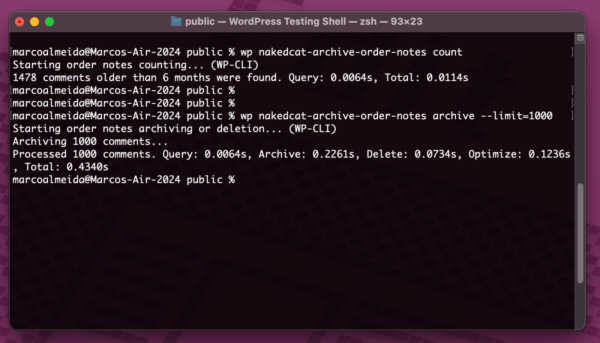
When should you consider archiving order notes
You should consider archiving WooCommerce order notes if:
- Your store has tens or hundreds of thousands of orders
- Your
wp_commentstable is dominated byorder_noterecords - Comment-related queries are slow
- Product reviews or blog comments take too long to load
Even if your site feels fast today, archiving order notes is a proactive optimization that can prevent future performance issues.
A small change with a big impact
In the customer case that inspired this plugin, a single change had a massive effect. By archiving more than 1.38 million order notes, comment-related queries dropped from several seconds to near instant execution.
This is a good reminder that performance issues are not always about caching or server size. Sometimes, the real problem is too much irrelevant data in the wrong place.
If your WooCommerce store has been running for a long time, take a look at your comments table. You might be surprised by what you find.
Launch pricing and license
To celebrate the launch, Archive Order Notes for WooCommerce is available at a special introductory price of 19€, down from the regular 39€.
Like our other micro plugins at Naked Cat Plugins, this plugin is sold with a one-time lifetime license. There are no renewals, subscriptions, or recurring fees.
Learn more
You can learn more about Archive Order Notes for WooCommerce, including detailed documentation and FAQs, on the plugin page and documentation section on our website.